Receive a notification when the dishwasher finishes
At our house, we use home automation for a lot of different things. One of them is the ability to get a quick overview of the state of our appliances such as the washer, dryer and dishwasher. That way we don’t accidentally forget to turn over the laundry or empty the dishwasher.
A red tile on our dashboard means something is ready for us to take action on – in this case that would be emptying the dishwasher after it finishes. See earlier blog post on how I built the dashboard below.

There are lots of tutorials on how to hook a “dumb” washer and dryer up to any home automation system, but I haven’t found any for the dishwasher that doesn’t involve figuring out how to hook up a power meter to it.
So, after a bit of trial and error I was able to do a highly accurate reporting mechanism using only a $20 multipurpose sensor that I had lying around.
The sensor
You need one or more sensors capable of sensing tilt, acceleration and temperature. I used the $20 Samsung Multipurpose sensor which integrates seamlessly into my SmartThings home automation system.
Attach the sensor along the side of the dishwasher at a place where it doesn’t get in the way. My wife didn’t notice the sensor until I asked her to look several days later.

The key is that the sensor needs to be located such that it can measure the raise in temperature from inside the dishwasher as it runs through its heated drying cycle. For your dishwasher, it might be higher up or even underneath.
Then go into the configuration of the sensor and specify it to be used on a garage door.

All that does is to use the tilt sensor to determine if it’s open or closed instead of the magnet. That way, you must open the dishwasher door all the way down to horizontal level before it registers as open. That’s what we want.
The automation logic
I’ve created a virtual switch called Dishwasher that I use to store the state of the dishwasher cycles which is what I use for the dashboard. It’s turned on when the dishwasher finishes and turned back off once it’s emptied.
It uses the fact that a bit of vibration occurs early on in the cycle, and temperature rapidly dropping after it finishes. The name of the multipurpose sensor is Dishwasher Sensor. Here’s the logic:
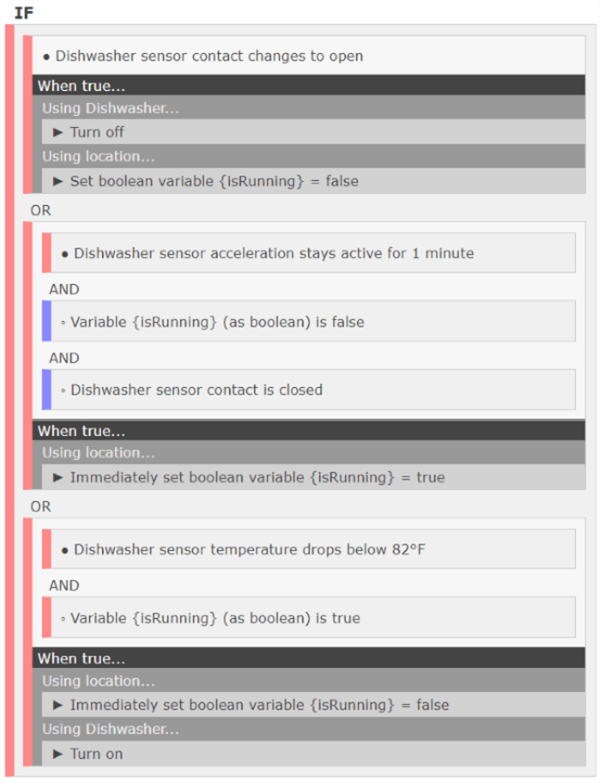
Notice how it uses the variable isRunning to keep track on when the dishwasher is running.
That’s it. Pretty simple, but it may require a bit of trial and error on where to place the sensor on the dishwasher door.


